

I have a scenario where I have migrated base NAV data over to Business Central cloud. Some custom fields for tables were not ported over to the cloud tables. As such, I needed to find a way to create these new fields in the existing tables and back sync data over to these new fields.
To do so, I thought of using configuration packages; however, due to the shear amount of records we were handling, exporting/importing excel files was too time consuming and often would break.
Retrieving NAV data
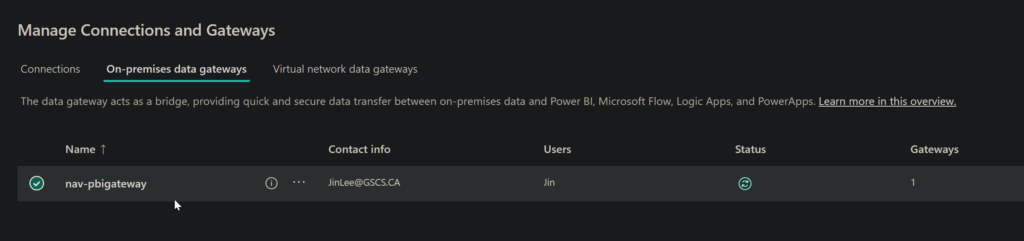
To retrieve the on-premise NAV data from sql server, I had to install the on premise gateway: https://learn.microsoft.com/en-us/data-integration/gateway/service-gateway-install. After doing so, I connected the on-premise gateway with my Fabric environment:
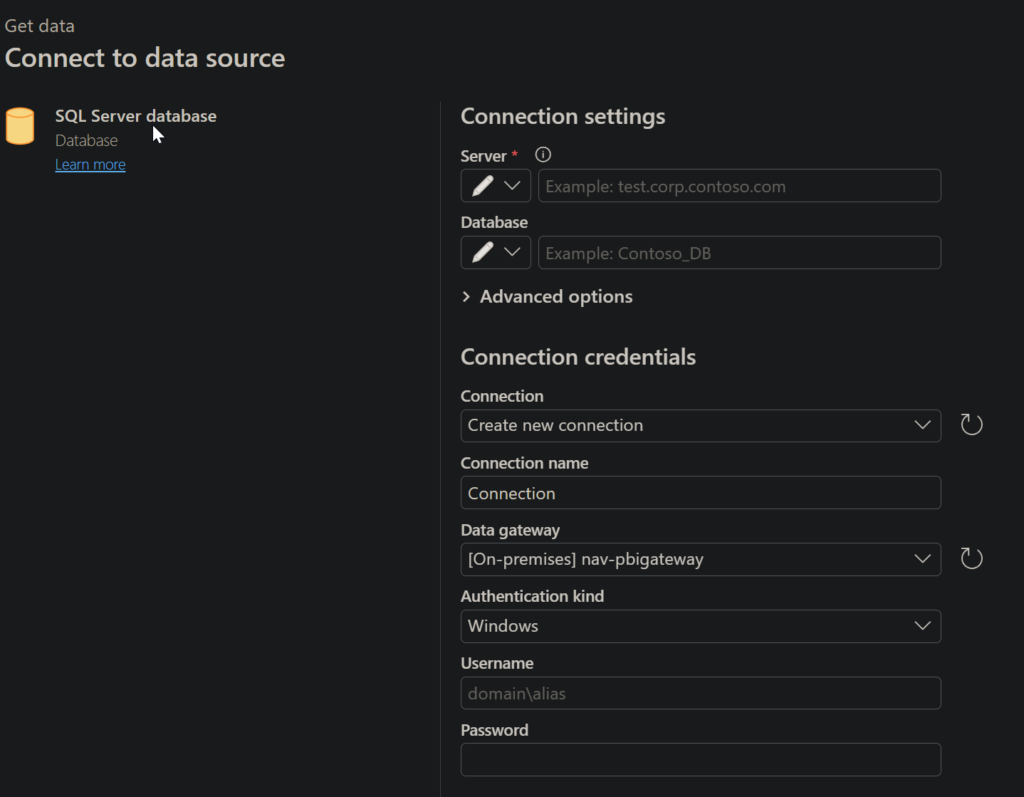
I then created a dataflow in Microsoft Fabric and removed some unneeded columns. I was able to connect straight to our db server using the SQL Server database data source connector.
Once the data was synced over to a delta table existing in our Fabric lakehouse, we were able to use a Pyspark notebook script to create a csv file:
# Define the Delta table path
delta_table_path = "[path]"

# Read the Delta table into a DataFrame
df = spark.read.format("delta").load(delta_table_path)

# Display a sample of the data to verify it loaded correctly
print("Preview of data:")
df.show(5)

# Define the output path for the CSV file
csv_output_path = "[path]"

# Write DataFrame as a CSV file
df.coalesce(1).write.mode("overwrite").option("header", "true").option("delimiter", ",").csv(csv_output_path)

# Verify the file was created
files = spark.read.format("csv").option("header", "true").load(csv_output_path)
print(f"CSV file created successfully with {files.count()} rows!")
I then installed the Onelake file explorer: https://www.microsoft.com/en-us/download/details.aspx?id=105222 and downloaded the csv file in question to my local machine.
Back Syncing Data over to BC
I utilized the CSV buffer in Business Central to create a custom extension allowing me to import a csv file with valid data entries: in this case, purchase invoice line entries. I created a list page to list out the records that were imported into the CSV Buffer temp table. I created a button that would help the user import the data to the csv buffer table and a button to take the records in the csv buffer table and see if we had an existing record and modify the appropriate record with custom data for self-assessment/t4a reportable values.
page 50001 PurchInvLineImport
{
    PageType = List;
    ApplicationArea = All;
    UsageCategory = Lists;
    SourceTable = "CSV Buffer";
    SourceTableTemporary = True;
    Caption = 'CSV Test';

    layout
    {
        area(Content)
        {
            repeater(General)
            {
                field("Line No."; Rec."Line No.")
                {
                    ApplicationArea = All;
                }
                field("Field No."; Rec."Field No.")
                {
                    ApplicationArea = All;
                }
                field(Value; Rec.Value)
                {
                    ApplicationArea = All;
                }
            }
        }
    }

    actions
    {
        area(Processing)
        {
            action(Import)
            {
                Caption = 'Import';
                Image = Import;
                ApplicationArea = All;
                Promoted = true;
                PromotedCategory = Process;
                PromotedIsBig = true;
                PromotedOnly = true;

                trigger OnAction()
                var
                    InS: Instream;
                    FileName: Text;
                begin
                    if UploadIntoStream('CSV file', '', '', FileName, InS) then begin
                        Rec.LoadDataFromStream(InS, ',');
                        Message('Lines = %1', Rec.GetNumberOfLines());
                    end;
                end;
            }

            action(SyncPIL)
            {
                Caption = 'Sync Purch. Inv. Lines';
                Image = BookingsLogo;
                ApplicationArea = All;
                Promoted = true;
                PromotedCategory = Process;
                PromotedIsBig = true;
                PromotedOnly = true;

                trigger OnAction()
                var
                    ModifyPurchInvLine: Codeunit "Modify Purch Inv Line"; // Call your Codeunit
                    DocumentNo: Text[255];
                    LineNoField: Integer;
                    SelfAssessedAmount: Decimal;
                    SelfAssessed: Boolean;
                    SelfAssessmentInvoiceNo: Text[255];
                    T4AReportable: Boolean;
                begin
                    Rec.Reset(); // Ensure no filters are applied

                    if not Rec.FindFirst() then begin
                        Message('No records found in CSV Buffer.');
                        exit;
                    end;

                    Message('%1 records found in CSV Buffer.', Rec.Count); // Debugging

                    if Rec.FindSet() then begin
                        repeat
                            case Rec."Field No." of
                                1:
                                    DocumentNo := Rec.Value;
                                2:
                                    Evaluate(LineNoField, Rec.Value);
                                3:
                                    Evaluate(SelfAssessedAmount, Rec.Value);
                                4:
                                    Evaluate(SelfAssessed, Rec.Value);
                                5:
                                    SelfAssessmentInvoiceNo := Rec.Value;
                                6:
                                    Evaluate(T4AReportable, Rec.Value);
                            end;

                            if (Rec."Field No." = 6) then begin
                                if Confirm(
                                    StrSubstNo('Invoice Line found:\nDoc No: %1\nLine No: %2\nAmount: %3\nUpdate?',
                                        DocumentNo, LineNoField, SelfAssessedAmount),
                                    false)
                                then begin
                                    ModifyPurchInvLine.UpdatePurchInvLine(
                                        DocumentNo, LineNoField, SelfAssessedAmount, SelfAssessed,
                                        SelfAssessmentInvoiceNo, T4AReportable);
                                end;
                            end;
                        until Rec.Next() = 0;
                    end;

                    Message('Purch. Inv. Lines synchronization complete.');
                end;
            }
        }
    }
}

codeunit 50002 "Modify Purch Inv Line"
{
    Permissions = TableData 123 = rm; // Read & Modify permissions

    procedure UpdatePurchInvLine(DocumentNo: Code[20]; LineNo: Integer;
                                 SelfAssessedAmount: Decimal; SelfAssessed: Boolean;
                                 SelfAssessmentInvoiceNo: Text[255]; T4AReportable: Boolean)
    var
        PurchInvLine: Record "Purch. Inv. Line";
    begin
        if PurchInvLine.Get(DocumentNo, LineNo) then begin
            PurchInvLine."SelfAssessmentAmount" := SelfAssessedAmount;
            PurchInvLine."SelfAssessed" := SelfAssessed;
            PurchInvLine."SelfAssessmentInvoiceNo" := SelfAssessmentInvoiceNo;
            PurchInvLine."T4AReportable" := T4AReportable;
            PurchInvLine.Modify();
        end else
            Error('No Purch. Inv. Line found for Document No: %1 and Line No: %2.', DocumentNo, LineNo);
    end;
}

Import list and button: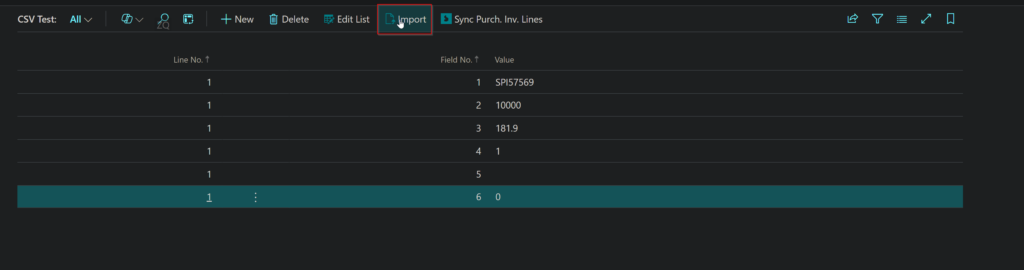
Sync PI Lines button and functionality:
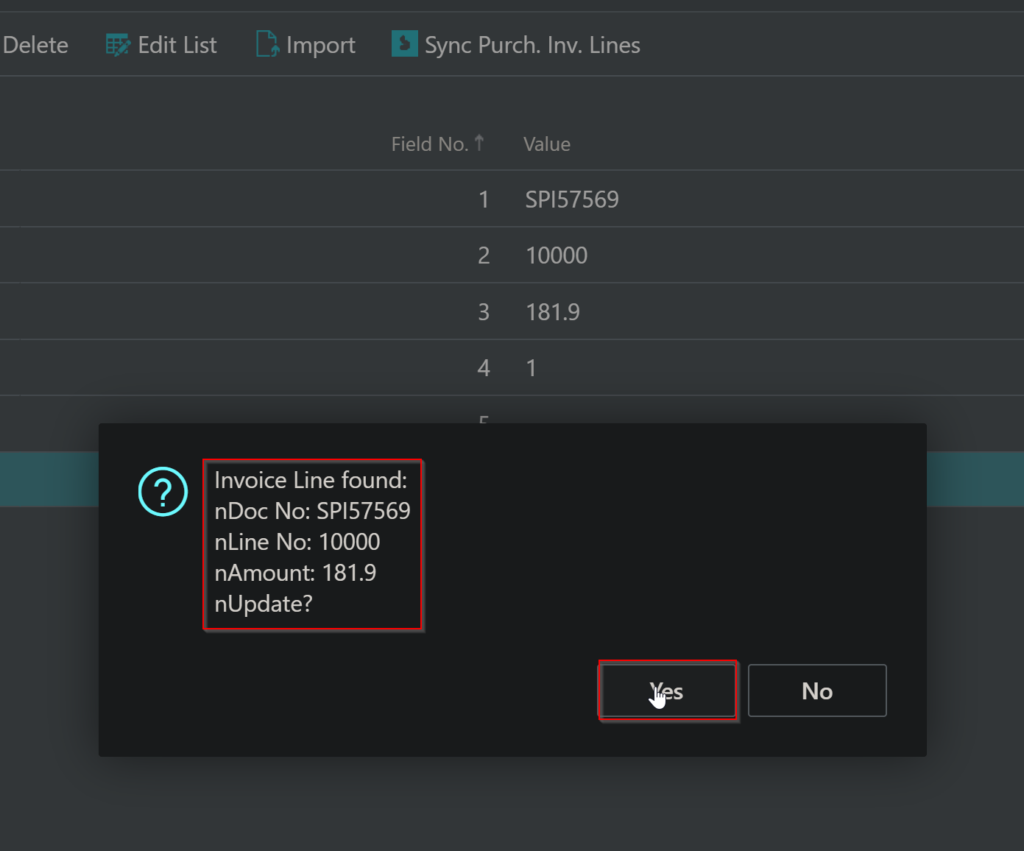
By clicking Yes, we modify the Purchase Invoice lines. We can check the table data to check that these fields are in fact changed.
NOTE:
Since there were ~900K records, uploading to a temporary table was fast due to it leveraging memory; however, when processing and updating existing records, this involved an update action to the db.
As such, the best way I found to approach slow processing speeds was to pre-process my existing csv file with 900k records (aka split up my csv file into relevant sub csv files). I recognized that most of the data in my csv file had no changes to what was already ported over to BC cloud, so I pinpointed the deltas and only synced over those records. It ended up being around 30k records which was significantly easier to process.
The update to existing records in BC has been complete!
Now, I have to focus on records that are not existent in our current bc db. To do so, my logic is:
- Go inside my BC cloud Purch Inv Lines table and check to see what date is the last migrated record (2022-02-15)
- Process my csv file to only include data after this last migrated date
- Add a new button in my CSV Buffer Import and Process page that will allow for Purch Inv Line record additions if unique